What do the deposit labels on your bookings mean?

Next to some bookings on your dashboard you will see a small coloured label about the deposit. Most are simple, but a few puzzle people. Here is every one of them in plain English, with what to do about it, if anything.
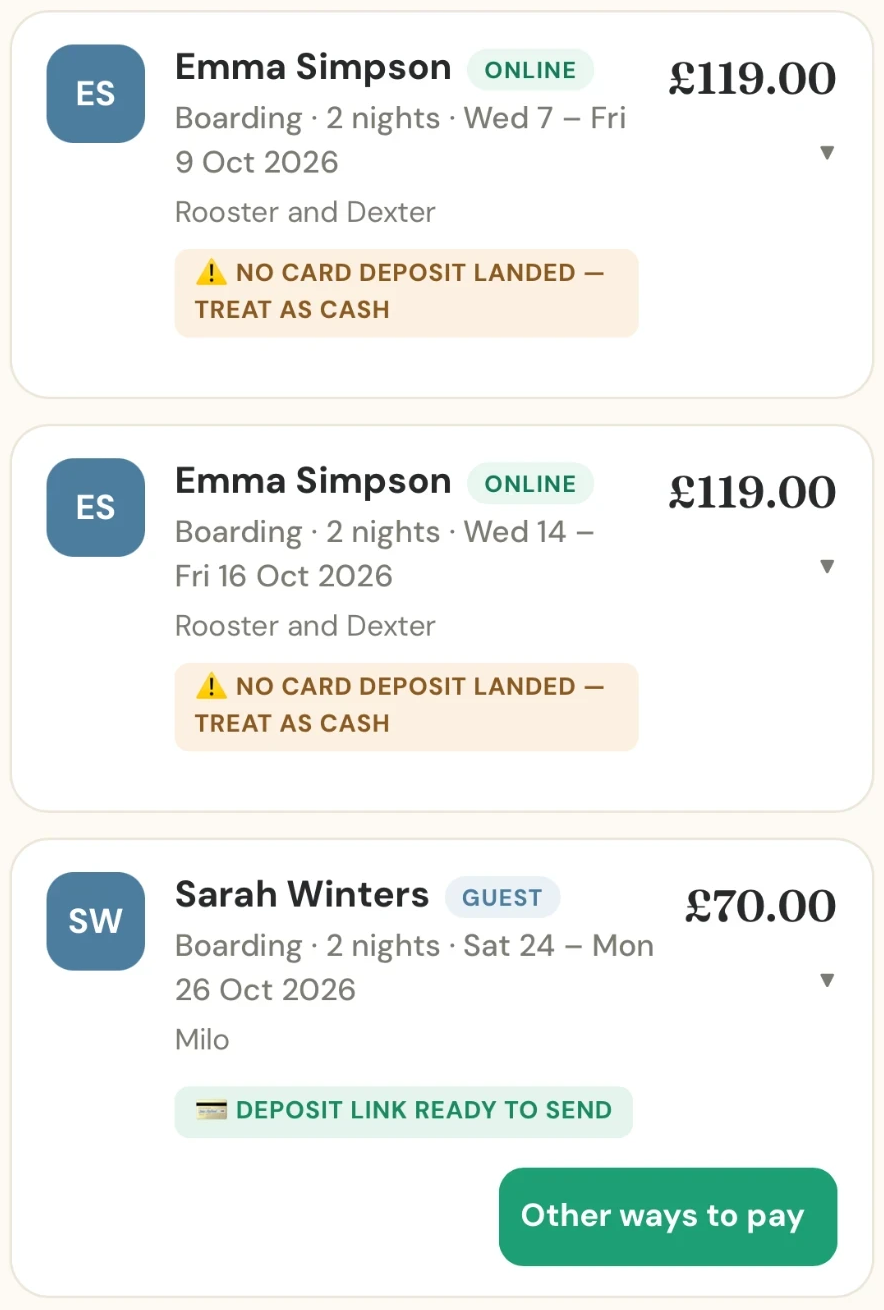
The everyday labels
- Deposit held (green): an owner has sent a request and their card is held for the deposit. Nothing has been taken yet. Accept the booking and the deposit is charged. If you decline, or the request expires after 72 hours, the hold is released.
- Deposit captured (green): the deposit has been charged and is in your Stripe account. It is sent to your bank the day after the booking finishes.
- Hold released (grey): the request was declined, cancelled or expired, so the hold on the owner’s card was released. Nothing was ever charged.
- Deposit refunded (blue): the deposit was returned to the owner, in full or, for one week of a walk series, just that week’s share.
- Deposit kept (grey): the owner cancelled too late and you chose to keep the deposit.
Why bookings months ahead are different
For a dog owner with an account, the app saves their card at booking time, with nothing charged, and takes the deposit automatically 87 days before the stay ends. These labels follow that journey:
- Deposit scheduled for a date (green): the owner’s card is saved and the deposit will be taken automatically on that date. Nothing for you to do. You and the owner both get an email three days before.
- Retrying tomorrow (grey): the first attempt to charge the card did not go through, so the app will try again the next day. Nothing for you to do yet.
- Owner needs to confirm their card (amber): the owner’s bank wants them to approve the payment, for example with a PIN or security check. They have been emailed a link. You can give them a nudge by phone or text.
- Deposit charge failed, with a reason (red): an attempt to charge the card failed, for example because it was declined or has expired. The app tries again, so wait for the next label.
- Ask owner to update their card (red): the card has been refused twice. The owner has been emailed a link to pay with another card, which works for 24 hours. A friendly message from you often sorts it.
- No card deposit landed — treat as cash (amber): see the next section.
“No card deposit landed — treat as cash”
- Keep it as a cash booking, and press Mark paid once you have been paid.
- Cancel the booking, if you would rather not keep it.
Guest bookings months ahead
A guest is a client you added yourself who has no account. Their card cannot be saved for later, so for a stay more than 87 days away nothing is charged and there are two labels:
- Guest deposit reminder due on a date (amber): that date is 87 days before the stay ends, and it is when the app will remind you to send a payment link. Until then, cash, bank transfer or your own methods work as normal.
- Deposit link ready to send (green): that date has arrived and the app has emailed you and sent a phone notification.
More to read: how a card booking works from request to payout, adding existing bookings with guest bookings and controlling your own card payments.
Questions and answers
Does The DoggyDesk cancel my booking if the deposit does not land?
No. The booking stays on your calendar and the dates stay held. You decide whether to keep it as a cash booking or cancel it.
Why can’t a deposit be taken straight away for a booking months ahead?
Stripe only lets card money sit in an account for around 90 days before it must be paid out, and your card money is paid out after the booking finishes. So a deposit is taken 87 days before the stay ends.
What does Deposit link ready to send mean?
It is a reminder that you can now send your guest client a card payment link. Nothing has been sent for you.
Do I have to use card payments for a guest booking?
No. Cash and bank transfer always work. Press Mark paid when you have been paid.