Guest booking vs Regular Booking

There are two types of booking that can be made on The DoggyDesk: a regular online booking, which the dog owner makes, and a guest booking, which you make yourself. The platform handles them differently. Here is how each one works.
Regular online booking
What the dog owner needs to provide: an email address, a phone number and details of their dogs. They do this once, when they create their free account.
How the booking process works
- The dog owner “makes” a booking. They can only book days you have set as available. See private and public days.
- The request comes to you. If you do not take card payments, the booking request comes straight to you. If you take card payments, the dog owner first gives their card details for a deposit, which is normally half of the booking total. Their card is held for the deposit, not charged yet.
- In reality the booking is only “requested”. You get an email, and the request appears in your dashboard, to say that someone has requested those dates.
- You check the dates actually work for you. You didn’t forget you had a holiday booked!
- You confirm the booking. You have up to 72 hours to accept or decline.
What The DoggyDesk does
We automatically send emails to both of you for bookings and cancellations.
Guest bookings
These are bookings YOU make, direct from your phone or The DoggyDesk app, in person or over the phone, for people you know.
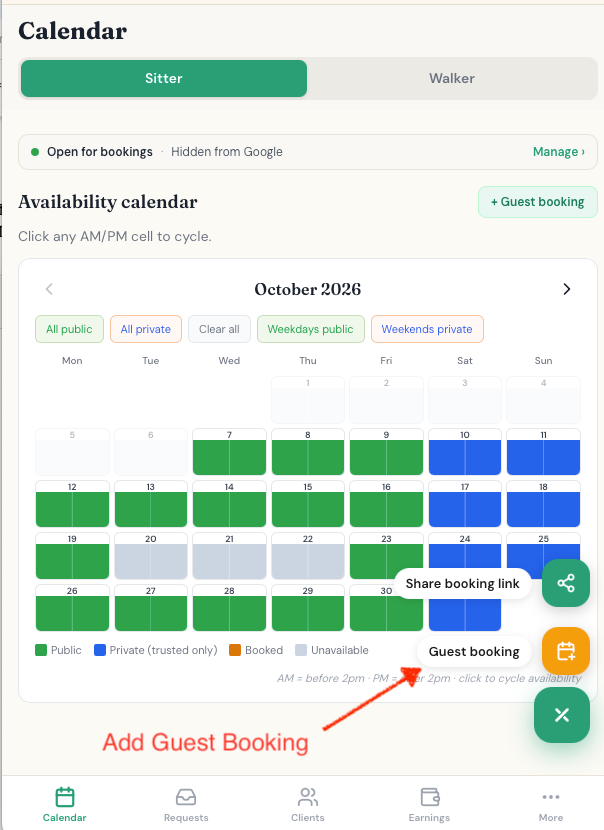
What the dog owner needs to provide: their name and mobile number only.
How the booking process works
You book the person in directly. Your client only gives you their name and mobile number.
What The DoggyDesk does
- Books the days straight away. The days are booked in your calendar automatically. There is no need to “accept” the booking.
- Writes the message for you. You are given a text message that you can send to your client by SMS, WhatsApp or email, and you can edit it in your messaging app before you send it.
- Adds a link. The message includes a link. Your client can open it to see the booking and, if they like, create a free DoggyDesk account and link the booking you just made to it.
Important differences
A guest is a client you added yourself, who has no account. This is deliberate. An account needs an email address and a password, which is not something you want to ask for when you are quickly booking in a client you have just met.
- Who makes the booking. Regular: the dog owner. Guest: you.
- Which days can be booked. Regular: only the days you have set as available. Guest: any day, as long as the drop-off and pick-up times are free.
- Confirming. Regular: nothing is booked until you confirm. Guest: booked in your calendar straight away.
- Messages. Regular: we email both of you. Guest: you send the message yourself.
Questions and answers
Does a guest client need a DoggyDesk account?
No. You only need their name and mobile number. They can create a free account later from the link in your message, if they like.
Do I have to accept a guest booking?
No. A guest booking is booked in your calendar straight away. Only regular online bookings wait for you to confirm.
Can I add a guest booking on a day I have set as private or unavailable?
Yes. You can use any day, as long as the drop-off and pick-up times are not already booked. If the stay overlaps another booking, you see a warning first.